Why businesses are switching to NFC access control systems


Trusted by 100,000+ organizations globally
As organizations globally grow and introduce more personnel and locations, they face increasingly sophisticated security challenges. Traditional lock-and-key methods are increasingly vulnerable, rapidly giving way to modern, touchless solutions.
Near-field communication (NFC) access control has emerged as a frontrunner in this transition, allowing facility personnel to secure building entry using the smartphones they already carry or through easily distributed cards and fobs. Security teams are migrating to this technology in waves, especially given that over two-thirds of enterprise security leaders agree that transitioning to mobile credentials significantly improves an organization’s overall authentication system.
This guide will explore NFC access control technology and why more organizations are implementing it into their business security systems.
What is NFC access control?
NFC access control is a modern security technology that uses short-range wireless communication to grant or deny entry to secured areas. By holding an NFC-enabled device, such as a smartphone, keycard or fob, within a few centimeters of a compatible access control card reader, there’s a near-instant exchange of encrypted data to verify the user’s identity.
Traditionally associated with payments, NFC technology can replace traditional mechanical keys and standard magnetic stripe cards with secure, dynamic digital credentials. As it leverages the robust encryption protocols built into modern devices, NFC access control offers organizations a highly secure, convenient and easily manageable solution for physical security.
Market researchers expect adoption of the security technology to increase significantly, with the market value reaching nearly $6 billion by 2031, cementing its popularity among enterprises.

Modernize access control with Avigilon
- Support secure NFC mobile credentials
- Enable touchless building access
- Manage and scale centrally
- Integrate with video security
How does NFC door access control work?
NFC door access control works through a quick, wireless data exchange between a credential device and a reader. When an employee holds an NFC-enabled smartphone or smart card near an NFC reader, the two devices establish a secure, short-range radio connection.
Once the device establishes a connection, the reader immediately requests and transmits the user’s encrypted digital identity to a central access control panel. The platform validates the credentials against its database to determine if the user has permission to enter that specific area.
If the system confirms the user is authorized, it sends a signal to unlock the door, a process that takes only a fraction of a second. The core steps of this process include:
- Credential presentation: The user brings their smartphone or card within a few centimeters of the NFC reader.
- Encrypted authentication: The reader scans the digital tag and securely forwards the data to the control system.
- Access decision: The system verifies the permissions and instantly engages or disengages the electronic lock.
NFC vs. RFID: Key differences
Often, people consider NFC and radio-frequency identification (RFID) access control to be the same technology because they function similarly to grant users access. However, there are differences between the two.
Below is a definition of the fundamental differences between RFID vs. NFC.
NFC
NFC focuses on secure, close-range data exchange, where authorized users wave their devices, such as smartphones, towards a reader to gain access to the desired area. While typically associated with contactless payments, the technology is gaining popularity in security applications that rely on high levels of encryption and biometric unlocking.
These systems often include:
- Two-way communication between a reader and a device
- Highly secure with encrypted data exchange
- NFC frequency is standard at 13.56 MHz and a read range of up to 4cm
- Typically used for contactless payments on smartphones
- NFC access cards can also include fobs, keycards and smartwatches
- A better fit for environments that require enhanced security controls
RFID
RFID access control typically relies on long-range, one-way communication from a physical device such as a keycard or fob. It stores and transmits a basic identification number that, when authorized, unlocks the door.
The primary features of RFID are:
- One-way communication from the device to the reader
- Read range can extend beyond 100m
- Users traditionally use the technology for scanning inventory and asset audits
- Supports specialized physical keycards and fobs for access
- Device transmits ID number to reader over radio waves to authenticate
- Best for high-traffic environments that can benefit from bulk authorization
Benefits of NFC access control
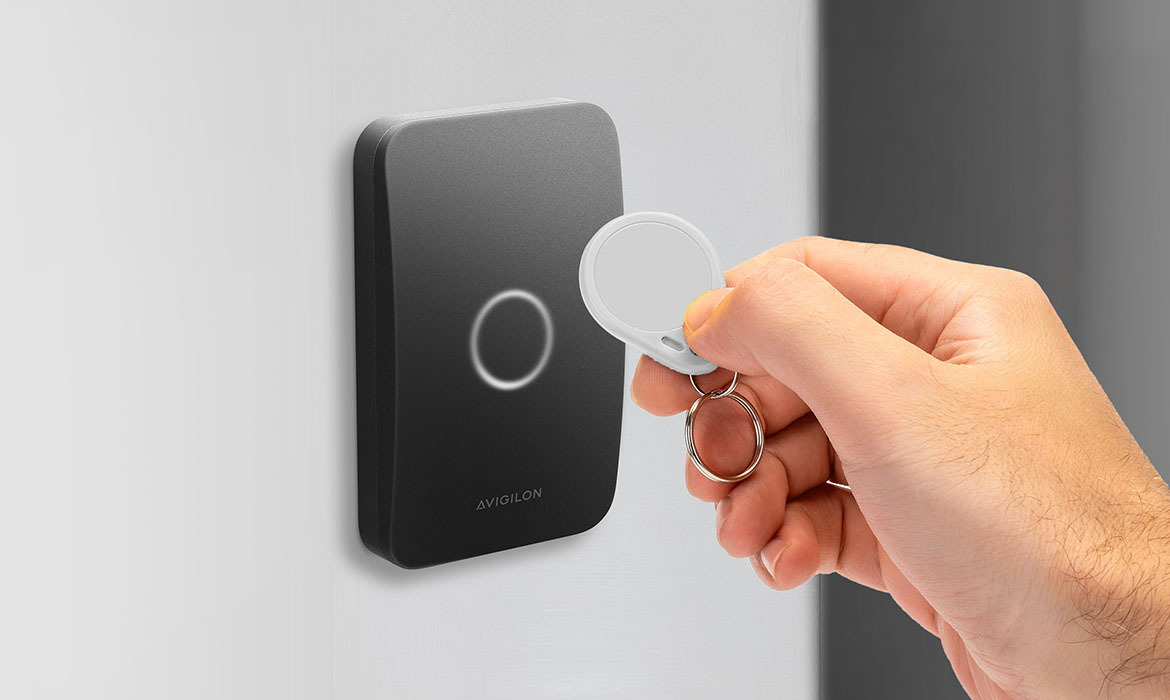
The benefits of NFC access control systems primarily center on the technology’s enhanced security. Its close-range, encrypted data exchanges can help mitigate unauthorized access and reduce the risk of cyber breaches.
However, there are a few other advantages it can bring to facilities:
- Convenience: These systems can create a more seamless entry experience for the user. There’s no need to touch anything or go through a verification process; authorized users need to wave their assigned device in front of the reader to access.
- Remote management: Security teams can gain greater control over area access through a remote management system that enables them to grant or revoke access quickly. The system facilitates a quicker response in the event of an incident in facilities.
- Improved security: Many devices have strong encryption to help reduce the risk of cyberattacks or physical breaches. Security teams can have more confidence that systems can mitigate the risk of trespassing in sensitive facilities.
- Flexibility: Advanced NFC systems can often accommodate multiple entry credentials and integrate with existing security infrastructure. The flexibility can be useful when building a scalable, comprehensive security system for your facilities.
- Speed: Implementing NFC readers can create near-instant access, making entry simple for authorized users. Entry speeds can be especially useful for organizations with peak entry periods.
- Cost reductions: Organizations can reduce costs by implementing systems that enable mobile access, reducing the need to purchase physical cards for new users or replace lost ones.
Drawbacks of NFC access control
While helping organizations create a more secure environment for their facilities, NFC access control can also have disadvantages. Limitations such as battery dependence and range can be a drawback depending on the security layout.
Here are the major drawbacks:
- Device requirements: Users will require a device, such as a keycard, fob or smartphone, to wave against the door reader to access. Employees or visitors with legacy phones or who are not immediately available to receive their access device may have difficulty entering the facility.
- Limited range: Users must be within 4cm of the NFC reader to attempt access to an area. While this is an intentional design choice, a considerable distance between the reader and the user may cause inconvenience, such as when a visitor needs to exit a vehicle to access the reader.
- System outages: If there’s a power outage or supporting systems are offline, access to controlled areas can be challenging. Without failsafe mechanisms, such disruptions could be costly for an organization.
- Device dependency: Some users may run out of battery on their phones or smartwatches or lose their keycards, leaving them without access while they wait for a solution. Security teams will need to plan for a manual fallback in such scenarios.
- Signal risks: While NFC access control can enhance security, it can also open a couple of risks. As the technology relies on short-range radio, signals are vulnerable to relay attacks, jamming and other interference.
Features to look for in an NFC access control system
NFC access control systems can provide organizations with a more efficient, convenient and secure way to control entry to facilities. However, with a broad range of systems now available, decision-makers seeking solutions may want to weigh up which features would best meet their security needs.
Below are the leading features to look for in an NFC access control system:
- Smartphone integration: Over 70% of the world’s population now has a smartphone, making integration as a credential device a highly convenient option for accessing an organization’s facilities. Users can tap NFC-enabled smartphones against readers to gain fast and easy access to authorized areas.
- Digital management: Systems with remote management capabilities allow administrators to issue credentials, grant access or revoke authorization more seamlessly. Security teams can manage users more efficiently through cloud-based software without ever needing to distribute or retrieve physical keys.
- Guest access: Managing temporary and guest access is a crucial component of an NFC access control system. Security teams should be able to easily generate temporary credentials with expiry dates to help manage visitors and guests within their facilities.
- Scalability: Many systems offer flexible hardware configurations that can scale with facility needs. Systems that integrate with other components can help build more proactive, comprehensive security infrastructure that adapts to continuously evolving risks and threats.
- Activity logs: An NFC system should have real-time activity logs to help security teams understand who is on site. The data helps enable a faster, more accurate response in case of an incident. Regular analysis of the information can also help facilitate continuous security improvements.
- Cybersecurity: These systems use short-range radio waves for close-proximity reading, helping to ensure there’s no remote eavesdropping. Data exchanges are also more secure, using high-level end-to-end encryption.
Considerations for choosing your system
If you’re considering implementing NFC access control in your organization’s facilities, there are a few questions you’ll want to weigh when choosing the right system. While there is a broad range of systems available to support needs, compatibility, scalability, security, management and budget are the major factors driving decisions.
Here are a few questions to help you decide on the right system for your facility:
- Which credentials will work best with the organization? (e.g., smartphone integration, key cards)
- Will this system integrate with your existing security system?
- Can the system operate during disruptions or outages?
- Is it scalable to facility needs?
- Is managing the system straightforward and fast?
- What’s your available budget to implement the system?

Download your free 2026 guide to access control
- Explore access control technologies
- Discover components and configurations
- Considerations when choosing a solution
- Complete checklist for implementation
How to implement a secure NFC door access control system
Once you’ve chosen a suitable NFC access control system for your facilities, here’s how to implement it.
1. Perform an audit of your access points
The first step in implementing a system is to conduct a comprehensive physical security audit of all access points where services may install door locks and readers. Consider areas that may require additional security or be subject to more extreme conditions.
Map out access points, the current traffic levels and door usage. Also consider emergency scenarios on how people will evacuate in the event of fire or other incidents.
2. Decide on credentials and readers
After your audit, consider the user base across the facilities and determine which credential type best suits those who need access to secure areas. Fobs, keycards and smartphones are the leading access methods for organizations.
Smartphones and smartwatches are becoming increasingly popular due to their convenience. However, where many users may not have compatible devices, keycards and fobs can serve as alternatives.
Additionally, when choosing readers, ensure they are durable in the conditions around the door. Ensure that the devices can withstand extreme weather or are resilient to potential radio-frequency interference.
3. Install hardware
Once you’ve decided on the components for your system, you’ll need to install the hardware. Typically, each access point will need a device reader and an electromagnetic lock to secure the door.
Other components can include intelligent NFC access control readers to verify user permissions for entry and request-to-exit (REX) sensors to automatically unlock upon exit.
4. Set up management software
Most NFC systems will have management software to support user authorization. When setting up, define access zones, users, authorization levels and any other information necessary for your organization.
Integrate the management platform with other security system components if compatible and available.
5. Issue NFC credentials
Distribute new NFC credentials to individuals who require access, including organizational employees and contractors. Security teams can send digital invitations for smartphones or request enrollment meetings for fobs and keycards.
6. Test and observe
Assign security teams to closely observe the NFC access control system to ensure it is working as intended. Address any issues promptly until the entry experience is acceptable for all users on the premises.
7. Complete NFC migration
Onboard and brief facility personnel about the new system and relay any necessary information to make the user experience more seamless. Regularly check access logs to ensure all doors and any system integrations are running correctly.
Key industries using NFC access control
Although NFC is typically associated with contactless payments and data exchange, its use in access control is becoming widespread across prominent industries. The bolstered security, convenience and ease of management are core drivers in its adoption.
Here are some use cases spanning different industries:
Offices
Corporate offices and facilities are well aligned with commercial access control systems, installed to ensure only authorized employees and registered visitors can enter the premises. As companies grow in number and in their building portfolios, NFC access control can be a scalable, convenient solution for managing user authorization across multiple locations.
Healthcare
Given health concerns in recent years, contactless transactions and authentication have become preferred methods of data exchange. NFC access control systems help hospitals and clinics prevent the transmission of infectious material by providing a touchless method while bolstering security for sensitive areas.
Education
Many campuses have areas with sensitive equipment or hazardous substances, making NFC access control for schools and universities particularly important. Student ID cards now double as NFC access credentials, allowing only authorized users into areas they’re certified to enter.
Residential
New builds and modern residential buildings are increasingly adopting smart locks, granting access via smartphones and smartwatches rather than traditional keys. 84% of technology enthusiasts value the idea of NFC residential access control for their homes, meaning a rise in adoption is very likely.
Hospitality
Hospitality venues, such as hotels, are benefiting from the transition to NFC smart cards and mobile credentials. Implementing the system can help keep loss and replacement costs down, while giving hotel staff an easier way to manage access to rooms and other secure areas.
Improve building security with NFC access control
NFC access control can help significantly bolster facility security by addressing traditional physical access vulnerabilities with encrypted digital credentials stored on smartphones, keycards or fobs. This technology allows administrators to grant, modify or revoke access permissions instantly, ensuring that only authorized personnel can enter specific zones.
Beyond simple lock-and-key replacement, advanced NFC access control systems can seamlessly integrate with broader security ecosystems to improve real-time visibility and provide data-driven insights for continuous security improvements. Every scan can help populate an audit trail that can be linked with video security and intrusion detection systems, creating a unified security network that can vastly improve detection and incident response capabilities.
FAQs
Have questions? We can help
Our video security experts can help you implement the right security system for your business.