Security system components: parts for smarter protection


Trusted by 100,000+ organizations globally
With almost 90% of businesses reporting more physical security threats recently, building a stronger defense is now a priority. To stop these threats, property managers need to know which security system components to put first.
This guide helps you identify the most impactful technology to keep your people and property safe. Understanding how these parts connect allows you to build a business security system that is both simple to use and difficult to bypass. Making the right choices now prevents small vulnerabilities from becoming major risks later.
What are security system components?
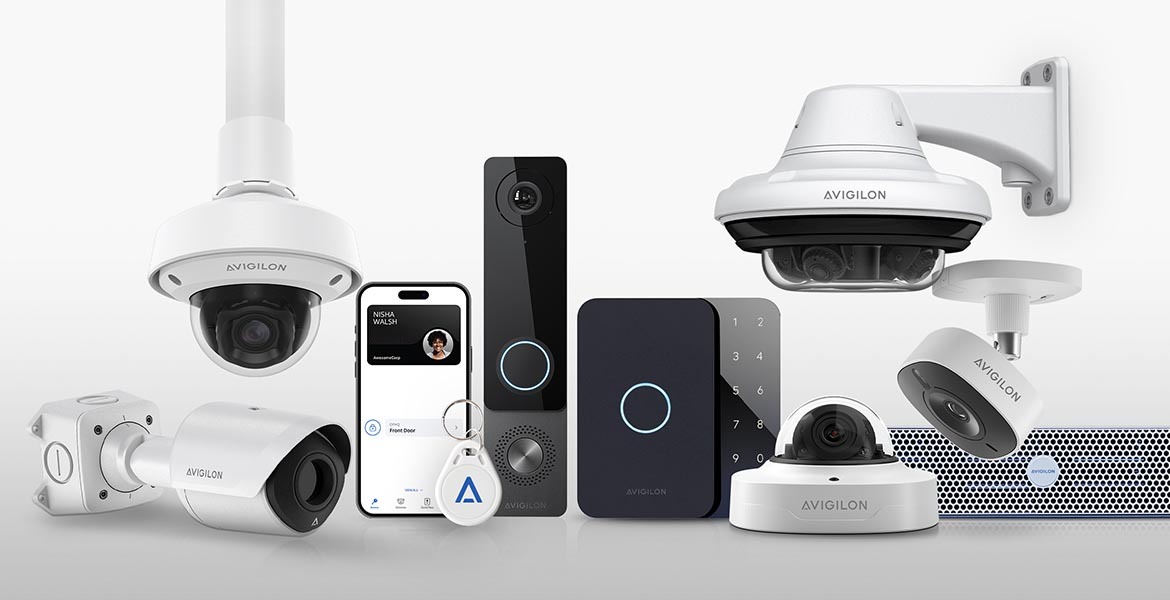
Security system components are the individual pieces of hardware and software that work together to protect your space. A truly effective system uses a layered defense where different parts communicate with each other. When your tools share information, they work as a single, smart unit rather than a collection of separate gadgets.
The parts of a system, like cameras, sensors and controls, fall into three main categories. Finding the right balance of hardware, software and human oversight is the key to a solution that fits your specific site.
1. Hardware
Core components in a security system include the physical tools you see every day: security cameras, smart sensors, readers and alarm components. While you can use a single tool like a camera on its own, these security components are most powerful when they work together as one integrated system.
2. Software
This is the digital brain of your protection. It includes everything from firewalls and encryption to the platforms you use to manage your site. These security components live on your computer or smartphone, giving you the power to monitor and control your hardware from anywhere.
Modern software also allows for automatic updates that keep your defense strong against new digital threats. By using a central interface, you can see real-time data and adjust settings across your entire property with a single tap.
3. Operational controls
These are the human rules and habits that keep everything running smoothly. While they aren’t physical security system parts, they are essential for staying compliant and making sure your tech actually does its job. Think of these as the playbook that guides your technology.
This includes regular maintenance schedules and clear response plans for when an alert is triggered. Without strong operational habits, even the most expensive equipment can fail to provide the protection you need.

Get your free 2026 guide to security technology
- Pressing security challenges facing businesses
- The current state of the security tech industry
- Top security technology trends of 2026
- Best practices for security infrastructure planning
Essential security system parts and components
A great system connects different tools to stop threats like trespassing, vandalism, theft and fire. To build a setup that actually works, focus on these key components in a security system:
Access control systems
Access control makes sure only the right people get through the door. Instead of traditional keys that are easy to lose, this technology uses digital credentials that leave a clear trail. Every time someone enters, the system logs the event automatically, so you always know who is on-site and when they arrived.
When you link access control with other security system components, your protection gets even smarter. For example, a forced door can tell a nearby camera to start recording or trigger an alarm instantly. It turns a simple locked door into an active part of your defense.
Key security components for access include:
- Door locks: Magnetic or electric strike locks keep doors secure. Choosing between fail safe vs. fail secure locks helps you balance everyday safety with emergency exits.
- Credentials: These are your modern keys. Whether it is a key card, key fob, mobile app or a biometric, these identifiers are much harder to duplicate than a piece of metal.
- Access readers: These scanners sit at your entry points. They check credentials in a split second and can even trigger other security system features like turning on lights when you arrive.
Environmental sensors
Environmental sensors act as the senses for your property. These smart, connected devices track changes in the air, sound and movement to keep you informed. The security system components also feed live data to your other devices so your system can react the moment something unusual is detected.
When you connect sensors to other security components like cameras and alarms, your building starts to think for itself. For example, a motion sensor can tell a camera to zoom in on a specific area or trigger a floodlight to scare off a loiterer. It’s about being proactive rather than just recording an event after it happens.
Common types of alarm components and sensors include:
- Motion: Sensors placed along fences or in quiet hallways alert you to movement where it doesn’t belong. They are your first line of defense against trespassing and break-ins.
- Sound: These smart ears listen for specific indicators of trouble like breaking glass, aggressive voices or calls for help. They can trigger an immediate response to help de-escalate a situation.
- Air quality: Beyond security, smart sensors protect the health of everyone on-site. They can detect smoke from a fire, carbon monoxide or prohibited vaping to keep your indoor environment safe and compliant.
Alarm and sirens
Alarms and sirens are the voice of your security strategy. They use loud, startling tones to alert everyone to a threat and encourage intruders to leave immediately. Research shows that just having visible alarm system components can deter up to 60% of attempted break-ins. They provide a clear, immediate signal that your property is protected.
By connecting these alarm components to your wider network, you can automate your response to different emergencies. This ensures that the right sound plays at the right time, whether you are dealing with a security breach or a safety hazard.
Alarm system parts work with other devices to address:
- Break-ins:When linked to sensors or access readers, alarms are activated the moment a door is forced or glass is broken. This immediate reaction is key to stopping a burglary in progress.
- Fires: Connecting your alarms to heat and air quality sensors ensures that everyone inside is notified the second smoke is detected. This saves vital seconds during an evacuation.
- Aggression: Smart cameras and sound sensors can trigger an alarm if they detect shouting or physical conflict. This helps draw attention to the area and can stop an incident from getting worse.
Video security cameras
Cameras placed in strategic spots around your facility allow you to investigate events as they happen or review footage later. Different types of CCTV cameras excel in different environments, so picking the right tool for each location is vital.
For instance, bullet cameras capture clear details at a distance with a narrow focus, making them perfect for guarding a perimeter. On the other hand, dome cameras provide a wide-angle view at close range, which is why they are a top choice for observing indoor spaces like lobbies or hallways.
Key security system features to look for in your cameras include:
- Night vision: Thermal and infrared modes capture clear images in total darkness, heavy fog or smoke-filled rooms.
- AI video analytics: AI-powered cameras can identify suspicious behavior on their own. They can flag loitering, recognize moved objects or spot environmental changes without a person needing to watch the screen 24/7.
- Remote PTZ controls: Pan, Tilt and Zoom (PTZ) cameras give you the power to follow an incident across a large area. You can track movement in real time without having to jump between different camera feeds.
Control panels
The control panel serves as the main physical hub for your security setup. It is the central interface used to arm your security system components and manage daily operations. Usually mounted to a wall in an accessible location, this panel connects to every other device on your property through wired or Wi-Fi connections.
Key security system parts in a modern control panel include:
- Screens: High-resolution displays let you review security system features and check live data at a glance. Most modern versions use intuitive touchscreens for faster navigation.
- Keypads: A physical or digital keypad allows you to arm or disarm the system in seconds. It also provides a quick way to adjust settings across all your linked devices.
- Communication: This technology uses cellular, network or landline connections to send live alerts to your phone or a security team. This ensures that no matter what happens, the message is delivered.
Digital management software
Management software puts the power to observe and adjust your security in the palm of your hand. It connects your security system components through the cloud, allowing you to manage your property 24/7 from any computer or smartphone. This digital bridge helps you respond to threats in real time, no matter where you are.
Digital management software acts as the command center for your entire setup. It allows you to program how different security components talk to each other, like telling a sensor to trigger a camera recording. It also delivers fast alerts so you can take action the moment something happens.
Key software features include:
- Centralized dashboards: See live and historic data from all your security systems and components in one clean, unified view.
- Push notifications: The system sends live alerts to your devices when it detects suspicious events. This keeps you informed without needing to watch a screen all day.
- Analytics: The software automatically organizes security data to help you spot trends and generate compliance reports. It turns raw information into clear, actionable insights.
Cybersecurity solutions
Cybersecurity tools like firewalls and encryption act as a digital shield for your property. Since modern security system components connect to the internet, they need protection against hackers and digital threats. Selecting hardware and software that is secure by design prevents your safety network from becoming a vulnerability.
Important digital protections include:
- End-to-end encryption: This technology scrambles data as it travels between your cameras, sensors and servers. It keeps your private video feeds and access logs unreadable to anyone without authorization.
- Multi-factor authentication (MFA): MFA requires more than just a password to log into your management platform. By adding a second step, like a code sent to your phone, it helps stop unauthorized users from taking control of your system.
- Endpoint protection: This specialized software guards every device connected to your network. It blocks cyberattacks at the device level to stop threats from spreading across your entire building.

Build your custom security system
- Smart hardware that talks to each other
- Mobile management from any device
- Scalable parts that grow with you
- Proactive AI to identify real threats
Choosing your security components
Before making a decision, think about your building’s unique layout and needs. The right types of security systems should fit your infrastructure today while staying flexible for tomorrow. Consider these factors before mapping out your plan:
- Wired vs. wireless:Wired security system components offer a solid connection and higher resistance to interference. Wireless systems are often faster and more affordable to install but require strong encryption to keep data safe from interception.
- Power: Your devices need constant power to do their job. Map out your power sources and consider backup generators or batteries to keep your property protected during a blackout.
- Installation costs: Check if your current wiring can support modern security components. If running new cables is too expensive, high-quality wireless parts might be a more cost-effective choice.
- Integration: Choose security system parts that can connect and communicate with each other. Look for open systems that use standard industry languages (like ONVIF or open APIs). This allows different hardware and software to work together as one.
- Management: Think about how you want to handle daily operations. Cloud-based platforms allow you to check in on your property from anywhere, providing better awareness and faster response times.
- Future scalability: Your needs will change as your business grows. Prioritize solutions that make it easy to add new security system parts later without having to replace your entire setup.
Protect your space with smart security
When you combine the right security system components, you do more than just secure a building. You create a system that identifies vulnerabilities and stops threats before they happen. This proactive approach leads to better safety outcomes for everyone.
By choosing smart security components, like cloud-based access, AI cameras and connected sensors, you build a defense that works around the clock. Integrating these tools helps your team stay ahead of risks and provides a safer environment for your people and your property.
Key takeaways
- Use a layered defense by connecting hardware, software and human procedures.
- Integrate access control with cameras to identify and log every entry event.
- Deploy environmental sensors to detect motion, sound and air quality changes instantly.
- Prioritize encrypted and secure components to protect your system from cyberattacks.
- Choose scalable, open systems that grow alongside your business and changing safety needs.
FAQs
Have questions? We can help
Our video security experts can help you implement the right security system for your business.