Complete guide to server room security

Trusted by 100,000+ organizations globally
One of the most critical areas of almost every organization is the server room. Most professionals working with company productivity tools will understand their significance, as they contain all the data and applications used for business workflows and processes, lying at the center of company productivity.
Their role in day-to-day operations highlights why server room security is a high-priority task within an organization. However, many IT administrators and facility managers often seek guidance to improve the security and performance of servers as the number of risks to the assets grows.
This guide offers insight into enhancing server room security, reviewing its importance, the challenges and best practices for your computer server room.
What is a server room?

A server room is a dedicated space that hosts computer servers for an organization or business. Server rooms house network equipment for authorized personnel to access stored data and applications from any location.
An IT server room and data center are becoming increasingly important to global organizations as more workflows, processes and operations transition to digital. The areas are specialized to host the network infrastructure, ensuring that the equipment functions at optimum efficiency.
Most rooms will feature integrated cooling mechanisms, adequate space for maintenance, increased security and preventative measures from natural disasters. These elements help reduce the risk of server malfunction and keep organizations’ data continuously online.

Smarter protection for server rooms and data centers
- Comprehensive physical security solutions
- Detect threats and get real-time alerts
- Help prevent unauthorized access
- Cybersecure, regulation-compliant products
Importance of server room security
Servers are a crucial element of business operations, which is why keeping them functional is imperative. Any downtime caused by equipment failure, break-ins, cyberattacks or natural disasters can be very costly to an organization.
As IT server rooms host all the necessary data infrastructure, overseeing the space for risks and threats is imperative. Here’s a breakdown of the importance of implementing server room security measures:
- Help ensure optimal conditions for server equipment
- Perform maintenance before any failures occur
- Mitigate risks of physical and cyber intrusions into systems
- Preparing for potential natural disasters, such as fire, earthquakes or flooding
- Optimize resource usage, such as energy and server space
- Consistently analyze security data to improve risk mitigation
There are several security systems and strategies organizations can use to benefit server rooms. Many will include a comprehensive data center security system that features security cameras, server room access control, an organizational schematic, devices with Internet of Things (IoT) sensors and emergency response plans.
Server rooms of any size can integrate a flexible solution with these elements that scales according to demand, reaffirming protection for the organization’s valuable network assets.
Common server room security challenges
Computer server room security is crucial to protect equipment and data. However, administrators face numerous obstacles in securing the spaces for optimal efficiency.
Here are the leading security challenges in a server room:
High temperatures
Server room temperature is one of the leading concerns of network administrators in organizations. As many disks in servers spin at full speed around the clock, they can produce a significant amount of heat, resulting in high temperatures that could compromise equipment.
Administrators must ensure that server rooms stay within an adequate temperature range for servers to function optimally. Server room requirements also include installing server racks with ventilation mechanisms to reduce the risk of overheating.
Intrusion
As servers become more critical to business operations, there’s a consistent threat of physical intrusion to the server rooms that could compromise sensitive data and cause downtime. Cyber threats such as DDoS attacks and ransomware are also a growing concern for security teams.
Security personnel will need tools to oversee access from the server room doors to protect the equipment. Server room and data center access control, video security, management software and IoT motion and sound detection devices can help prevent and deter both physical and cyber intruders.
Insider threats
Physical and cyber threats can come from within the organization as well as externally. There has been a rising number of high-profile employee server breaches, including insiders sharing data on client bank accounts.
Administrators will need to ensure access permissions to server rooms for staff are accurate, paired with visual oversight of the server room to help protect equipment and data.
Vibrations
Vibrations in a server room can impact the sensitive equipment inside network enclosures. Earthquakes pose a significant risk to server integrity, as vibrations can dislodge or damage equipment, causing downtime.
Even accidental bumps from personnel into servers can cause maintenance issues. Administrators should consider protective measures such as anti-vibration mats under equipment or consider a location with minimal vibration risk.
Moisture
Humidity can also be a concern in a computer server room. It can be a result of high temperatures and poor ventilation. A humid server room can cause equipment to corrode and rust, leading to potential damage and downtime.
Optimal server room standards recommend using IoT sensor devices to measure humidity as it helps identify when corrective action is necessary.
Fire
Like most facilities with large amounts of electrical equipment, there is an increased risk of fire in a server room. Administrators must identify and prepare for fire risks and take swift action to extinguish them.
Fires can cause significant damage to server rooms if not contained quickly, severely impacting business operations. As part of a server room requirements checklist, security teams can implement fire detection systems with real-time notifications and install fire extinguishers and blankets to take action should an incident occur.
Power supply
Server rooms require reliable power to ensure equipment stays functional and organizational networks remain online. Power supply interruptions are not only risks to operations, but also to server room security.
Administrators must plan for the risk of blackouts, electrical volatility or extreme weather events that affect the power supply. Security teams should consider using uninterruptible power supply (UPS) units to ensure servers stay online and install backup systems.
Room layout
The layout of a server room impacts the performance and security of equipment. Responsible teams should ensure an adequate room blueprint to allow sufficient ventilation, easy access points for maintenance and keep areas organized and free of clutter.
As part of a server room requirements checklist, administrators should publish an organizational schematic for the server room that’s scalable and flexible according to business needs.
Free data center security guide
Get our free guide and checklist to improve your facility’s security posture. Discover:
- Common threats and challenges
- Key regulatory and legal considerations
- Comprehensive security strategies
- A complete security checklist
Server room requirements checklist
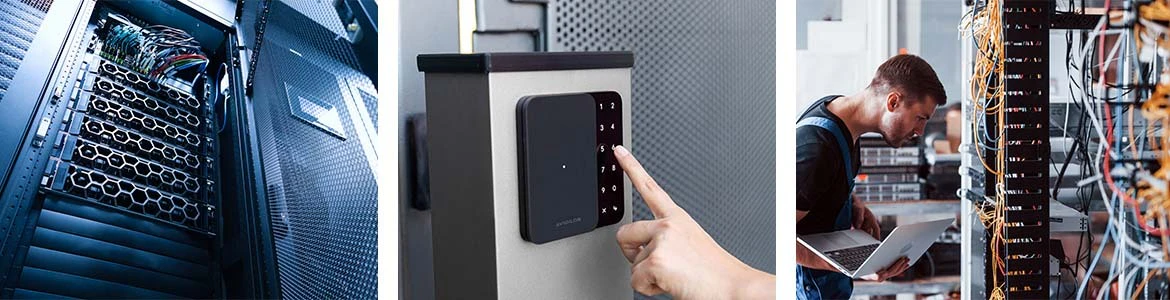
There are key considerations that can help security teams overcome challenges in server rooms. Optimizing each area helps deliver a more efficient operation, also leaving room for growth and expansion as needed.
Here’s a server room requirements checklist to help enhance security:
1. Cooling
Cooling is one of the most integral parts of server room operations, requiring adequate temperatures at all times for equipment security. Server room administrators should consider the following:
- Install air conditioning systems above server locations
- Implement temperature and humidity detection systems with real-time notifications
- Maintain sufficient space between server racks for ventilation
- Check that the servers are not next to heat-generating equipment
- Regularly inspect cooling units to help ensure functionality
2. Space
Leaving adequate space and implementing measures to reduce traffic helps keep the room secure. Therefore, you should consider:
- Implementing server room access control systems to manage occupancy
- Organize and label all cables and access ports
- Keep paths clear throughout the server room
- Regularly clean and dust the equipment
- Ensure adequate space to perform maintenance and improve airflow
3. Equipment
Server room equipment will require additional security measures to protect its integrity and performance. To achieve high server room security standards, you should:
- Ensure all servers and equipment are in locked enclosures
- Install UPS units to help ensure a constant power supply
- Have a backup electrical system in case of a power failure
- Perform regular audits on all equipment to check performance
- Install local communication lines to contact the server room personnel quickly
4. Security apparatus
Administrators should consider multiple visual and detection devices as part of a comprehensive server room security strategy, including:
- Implementing an IP camera system around the server room for visual oversight
- Secure server room doors with access control systems to help mitigate unauthorized entry
- Use IoT detection devices for sound, temperature, motion and humidity to boost room and equipment security
- Integrate a real-time notification system for instant alerts on any security anomalies
- Install server room management software for activity logs, cyberthreats and security system control
- Ensure an emergency response plan is in place for incidents such as fire or intrusion
5. Maintenance
Server room teams should conduct regular maintenance to help ensure optimal equipment performance and bolstered security, taking into account the following:
- Create a maintenance plan for the server room
- Regularly audit and test the security apparatus
- Continuously check environmental measuring devices
- Record all maintenance conducted in a log
- Ensure any new updates to software don’t compromise systems
Best practices for server room security
As stated, security is fundamental to an effective and efficient server room for organizations. Server room and data center physical security technologies can help teams and administrators prevent potential threats from reaching the server room and its equipment, with key solutions including the following:
Server room access control
Server room access control is a key foundation of any robust server room security strategy. It helps control access to the server room door, granting access only to authorized personnel.
By preventing unauthorized physical access at server room doors, organizations can avoid potential data breaches, equipment tampering or theft. Best practices for installing an access control system for your server room doors include:
- Optimize security: Select the right access control method for your server room, such as keycards, biometrics, PIN codes and more. For enhanced security, biometric access provides a more secure method, as duplicating someone’s fingerprint or retina scan is difficult.
- Create access logs: Ensure the server room access control system logs all activity. This information helps provide a clear record for accountability and incident investigation.
- Conduct regular reviews: Performing reviews of your system, including updating access permissions and relevant software, helps reduce the chances of an intrusion and ensures your system is operating optimally.
- Integration: Seek to integrate the server room access control system with other security solutions, such as security cameras and sensors, for enhanced situational awareness and response capabilities
Video security
Security camera systems provide the situational awareness organizations need to help protect server rooms. By capturing video, security teams and administrators can observe real-time and past activity to detect unauthorized access and other security events.
The evidentiary footage captured also supports post-event investigations, providing a visual overview of what happened.
Best practices for implementing video security include:
- Strategic placement: It’s crucial to position cameras to cover all server room doors, equipment racks and sensitive areas without blind spots.
- Advanced video security: Select cameras that provide high-resolution images and key capabilities such as low-light capabilities, AI-powered video analytics for automatic threat detection and integration capabilities.
- Storage and retention: Proper video footage storage is vital for security operations, investigations and compliance with industry regulations.
- Consider privacy: Install clear signage leading up to and in the server room to notify individuals that their activities are being recorded and to adhere to relevant regulations.
Sensors
Sensor technology is an invaluable tool for maintaining optimal server room conditions and detecting anomalies. By continuously monitoring the environment, they provide real-time data on various parameters, including temperature, humidity, motion and sound. This enables administrators to respond to issues before they escalate.
Best practices for installing and utilizing sensors include:
- Variety of sensors: Install sensors for each element that you need to monitor, such as temperature, humidity and smoke. For a comprehensive security solution that saves you time and money, choose an all-in-one device that provides several sensor types.
- Sensor placement: Ensure the sensors are positioned in key areas, such as near server racks, cooling units and server room doors, to gather accurate and comprehensive data.
- Alarm configuration: Configure the correct thresholds for each sensor type. This will ensure alarms are triggered when readings fall outside of the threshold range, enabling administrators to implement corrective measures to maintain a safe and secure server room.
- Regular testing: Perform regular sensor tests to ensure they are calibrated correctly to provide accurate data.
Comprehensive server room security by Avigilon

Avigilon, a part of Motorola Solutions’ technology ecosystem, is the ideal security partner for comprehensive server room security. Its portfolio of physical security technologies helps secure your valuable equipment and keep operations running smoothly.
From on-premise and cloud-based access control and AI-powered cameras to smart sensors and site protection systems, Avigilon can help your organization accurately detect threats, enhance situational awareness and automate security workflows to help you keep intruders away and investigate incidents.
As a trusted server room security partner, Avigilon’s cybersecure solutions are FIPS-compliant and are FCC-authorized, helping you comply with industry regulations. Additionally, the technology’s open architecture design means that Avigilon’s server room solutions seamlessly integrate with your existing security systems, helping you save on major overhaul costs.
Create high-performing server room standards for security
An optimally performing network will have efficient servers running in rooms with exceptional security and performance standards. That’s why server room security is an imperative part of many organizations’ growth and development plans.
While many business operations vary in size and scale, these standards apply to almost every server room looking to secure equipment and scale with demand. Whether it’s a few racks or hundreds of enterprise-level server cases, a refined, protected and organized server room can benefit any company’s digital processes and workflows.
Have questions? We can help
Our video security experts can help you implement the right security system for your business.