Guide to school visitor management and check-in systems

Trusted by 100,000+ organizations globally
School visitor management is a critical safety measure for all educational institutions, with custom electronic sign-in systems helping to safeguard students against far-reaching threats.
As many as 98% of U.S. public K‑12 institutions utilize some form of visitor management system to help prevent dangerous individuals from entering grounds. However, this includes traditional paper-based processes that may not be suitably equipped to address present risks.
To help schools upgrade outdated check-in systems and enhance site-wide security, the guide below includes all you need to know about modern visitor management systems for schools, including tips for overcoming challenges and selecting the best option.

Modern visitor management for schools
- Enhance security & simplify guest check-in
- Gain real-time insights into visitor activity
- Manage visitors remotely anywhere, anytime
- Seamlessly integrate with access control
- Cloud-based, scalable and flexible
What is a school visitor management system?
School visitor management involves the processes and technologies that educators use to help ensure everyone who enters school grounds is authorized, safe and properly accounted for.
The most basic form of visitor management is a sign-in system for schools that asks all visitors to declare their name, time of visit and reason for visiting on a physical form. However, as this type of system can be easily bypassed, many organizations now use an electronic school sign-in system.
How does a school check-in system work?
Visitor check-in systems for schools use digital technologies to screen visitors before they access school grounds and keep detailed logs of all access events, enabling staff to follow step-based processes when assessing access requests and investigating security incidents.
Visitor check-in
On arrival, visitors are directed to the school’s reception area and asked to interact with the school check-in system. The guest must present a form of government-issued ID, such as a driver’s license or passport, to a manned or self-service check-in kiosk to begin the process.
Typically, the guest will have been informed of this process before their visit via email or SMS. The school will have advised the guest to ensure they bring a valid form of ID and navigate towards the school’s reception area as soon as they access the site.
Identification screening
Next, the system will automatically scan the ID and check the information against relevant databases to ensure the guest is not wanted for any crimes or banned from school grounds.
Most K‑12 visitor management systems will cross-reference guest IDs against national sex offender registries, local criminal record databases and internal lists of banned and high-risk persons. If the guest fails the screening, relevant internal or external authorities will be called.
Confirmation and badging
Once the school visitor software has cleared the guest’s ID, the person can formally check in to the site. The guest will be asked to provide some basic details, such as their name and reason for visiting, and have a new photo taken, all of which will be printed on a visitor’s badge.
Some K‑12 school visitor management systems allow guests to provide basic details before their visit via an online form; however, photos will usually need to be taken on-site. A time and date-marked ID badge will be printed at the entry point for the guest to wear during their visit.
Real-time management
After the initial check-in process, the visitor’s information will be logged and transferred to a real-time management system. Here, administrators can keep track of who is on the property at any given time and receive live notifications if any irregularities or security concerns arise.
A basic visitor management system for K‑12 schools may enable staff to set alerts warning of visitors who have failed to check out after a pre-approved period. Advanced systems can be integrated into electronic access control systems to warn of attempts to enter unapproved areas.
Check-out and record keeping
At the conclusion of their visit, guests are asked to return to the reception area, return their ID badges and follow the sign-out process. Staff will ensure the event is marked as fulfilled in the school sign-in system and answer any relevant questions before directing the guest to the exit.
All important details of the visit will be automatically stored and organized in the school visitor check-in system. Authorized staff will be able to access these records, use them to update wider databases and reference them during audits and investigations as and when necessary.
Benefits of a visitor management system for schools

Visitor management and sign-in systems for schools provide several benefits, including streamlined access control and facility management operations and improved site-wide safety.
By providing teachers, administrators and security staff an accessible and organized way to screen visitors and review entry logs, schools can help safeguard students and staff against threats.
Below are some key benefits of implementing a visitor management strategy for schools.
Protects students, staff and visitors
School visitor management systems act as a first line of defence against unauthorized access and potential threats. By screening visitors before they enter school grounds, staff help ensure that no persons with known criminal convictions come into contact with students, staff and visitors.
A typical school visitor check-in system verifies an approved form of ID, such as a driver’s license or passport, against up-to-date local, state and national criminal databases. If a guest is flagged as a potential danger, further action can be taken by relevant authorities.
Accurately validates identities
Visitor management software for schools can be programmed by staff to contain up-to-date information associated with every student, including their caregiver. Should a student need to leave the school during the day for any reason, the system can be used to validate and log the event.
In some schools, validating custodial rights can be difficult. Sensitive situations, for example, custody disputes or court cases, can complicate matters. Visitor management for schools helps reduce confusion with data-informed responses that help safeguard students.
Provides real-time occupancy information
A visitor sign-in system provides staff with accurate, data-rich logs of all access events during the school day. Should an emergency occur, such as a lockdown, fire or active harmer event, staff can quickly and reliably confirm occupancy records to inform relevant responses.
School visitor management system data also supports investigations into past events, providing supporting information that can be used to look into potential crimes. For example, staff can narrow down suspects for acts of theft or vandalism by reviewing relevant school visitor logs.
Efficiently manages visitor badges
Modern visitor management systems for schools can not only help reception, security and administrative staff confirm the identity of guests, but also aid the wider school community in understanding the nature of a person’s visit via easily recognizable, bespoke visitor badges.
Information derived from the school visitor check-in system can be used to create data-rich ID badges at the point of entry. Visitor badges can display the person’s name and reason for visiting, as well as be color-coded to help students and staff easily identify guests.
Enhances wider school security solutions
School check-in software can be integrated into wider physical security systems to enhance safeguarding operations and security responses. Solutions can be integrated into existing access control, video security and alarm installations to support automated responses to common threats.
For example, if school check-in systems flag a visitor as potentially dangerous, signals can be sent to relevant devices to trigger a response. Nearby doors can be secured, silent alarms can be raised and school security cameras can flag footage, with details instantly sent to security personnel and local law enforcement.

Get free school security grant assistance
Improve your school’s safety with our Grant Assistance Program. Our experts can help you:
- Find relevant funding opportunities
- Increase chances of receiving funding by 60%
- Choose the right security solutions for you
- Submit a successful application
Challenges to implementing school visitor management and sign-in systems
Building and implementing school visitor management systems can be challenging, requiring agreements across multiple stakeholders to select, configure and optimize core components.
Below are a few key issues to address when designing a school visitor management system.
Data privacy concerns
A visitor management system for schools requires access to identifiable information to function effectively. Sensitive data, including names, photos and private contact details, must be managed in accordance with strict privacy regulations, such as the Family Educational Rights and Privacy Act.
Ensuring workflow efficiency
The best school visitor management system strikes a balance between security and convenience, allowing staff to grant swift access to authorized visitors during busy periods. Check-in processes must be structured and efficient to promote compliance and limit holdups that introduce confusion.
Staff training and compliance
The efficacy of these systems relies on effective and consistent use. Staff must be trained in how to safely and efficiently operate school visitor management software and hardware tools, as well as adhere to organizational best practices related to administration and security responses.
Integration with wider systems
Many schools have existing security solutions in place to log attendance and capture data. Integrations between school check-in systems and these tools should be pursued to improve threat responses, with assistance provided by certified IT and security integration specialists.
Maintenance and support
School visitor management systems must be regularly tested and updated to ensure effective operations and protect systems against unique cyber threats. Some providers offer ongoing support for active systems, including regular cloud-administered software updates.

Download your free 2026 guide to visitor management
What’s inside:
- Core features and how the system works
- Key components and configurations
- Factors to consider when choosing a solution
- Complete checklist for implementation
How to choose the best school visitor management system
An effective visitor management system for schools must be intuitive, feature-rich and designed to support custom security workflows. To help decision-makers identify the right tools and technologies, here are some key features to look for in this type of system.
1. Secure ID scanning and verification
Visitor management systems for schools must be able to swiftly and securely scan verifiable forms of ID, such as driver’s licenses, passports and state-issued ID cards. The process for scanning IDs should be straightforward to teach to administrative staff.
An electronic sign-in system for schools must also have provisions in place to secure identifiable data against cyber-risks. They should be secured behind digital access controls and monitored by cybersecurity tools, including endpoint detection and response solutions.
2. Comprehensive background checks
Alongside verifying visitor IDs against internal records, effective school visitor management systems will perform background checks informed by police and government records.
Tools must provide access to up-to-date sex offender registries, watchlists and criminal databases.
3. Visitor badge management features
The best school visitor management systems not only help administrative and security staff prevent intrusions, but they also provide students and teachers a way to visually confirm the identities of unknown individuals, including contractors, volunteers and parents on school grounds.
Prioritize visitor management software for schools that features native visitor badge creation tools, allowing staff to create and print data-rich, color-coded IDs at entry points. IDs should include details such as the visitor’s name, photo, reason for visiting and the date/time when the ID was issued.
4. Customizable workflows and alerts
While the basic functionality of a sign-in system for schools will be suitable for all types of educational institutions, ideal workflows and responses will differ depending on unique criteria.
Look for systems that support custom workflows and alerts to help address security and resource-availability gaps.
5. Cloud-based storage and reporting
Should a threat, such as an active harmer or intrusion event, occur, all relevant staff must be informed as quickly as possible. A Cloud-based visitor management system for schools supports remote access functionality and real-time alerts, improving site-wide situational awareness.
By choosing to build a cloud-based school visitor management system, administrators also empower security teams to access and compile reports remotely. Should staff need to review or manage data outside normal hours, systems can be accessed remotely via smart devices.
6. Comprehensive integration capabilities
The visitor check-in system can be enhanced through integrations with wider school security systems, with data shared between devices supporting automated threat responses. Staff should prioritize ONVIF-conformant cloud-based tools to improve integration capabilities.
Improving school safety with Avigilon Alta Visitor
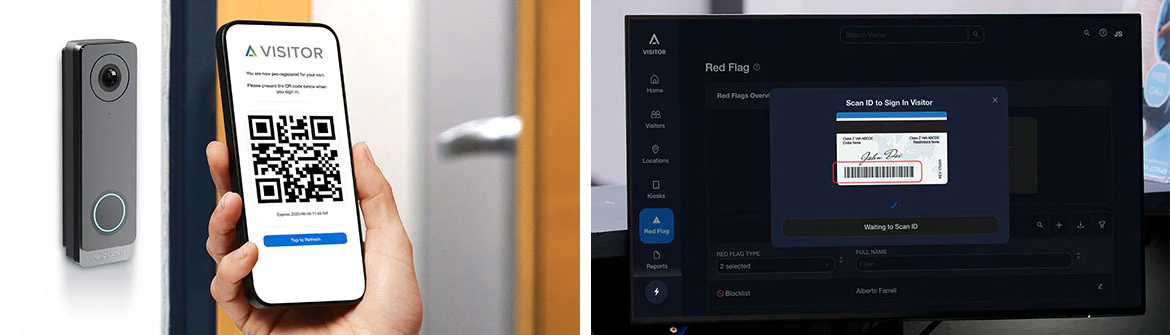
Smart visitor management is easier than you think with Avigilon Alta Visitor – a cloud-based visitor management solution designed to streamline processes and help protect your school. It offers easy self-check-in and host alerts, while your school security team and administrators have control over who is on-site and where they can go.
Alta Visitor provides real-time insights into guest activity and features built-in ID validation to help ensure only authorized visitors enter your school grounds. Additionally, this visitor management system seamlessly integrates with access control to issue digital guest passes that unlock only approved areas using PINS, QR codes or mobile credentials, eliminating the need for physical badges.
Explore the solution, now a part of Avigilon Alta’s cloud-based security system suite.
Pursue an integrated approach to school visitor management
Responsibly limiting and tracking access events in educational environments is key to safeguarding children against common threats. Alongside access control solutions, visitor management systems help prevent potentially dangerous individuals from entering school grounds.
The best school visitor management systems will be able to scan visitors’ IDs, check details against criminal databases and engage automated responses to uncovered threats. Additionally, it will enable staff to create visitor badges that help the wider school community identify guests.
By pursuing an integrated approach to school visitor management, leaders can enhance the functionality of existing tools, including access control, video security and alarm systems, to support automated safety responses and provide stakeholders with a holistic view of security operations.
FAQs
Have questions? We can help
Our video security experts can help you implement the right security system for your business.